
How to Make Your Own Wedding Invitations Online for Free: Easy Steps to Customize Your Special Day
Making your own wedding invitations online can be a fun and creative way to get exactly what you want without spending a lot of money. You can use free online tools to design beautiful DIY wedding invitations that reflect your style and personality. With the right resources, you can easily create stunning invitations that impress your guests and set the tone for your big day.
In the world of wedding planning, invitations are one of the first tastes of your celebration that guests will see. By designing them yourself, you have complete control over the look and feel. There are plenty of free options available that offer templates and customization features. This way, you can add your own touch without needing design skills.
Learning how to make your own wedding invitations online can not only save you money but also make your wedding feel even more personal. Whether you want an elegant or quirky design, you’ll find the perfect style that matches your vision.
Choosing Your Wedding Invitation Design

Creating your own wedding invitation design is a fun way to express your style. You’ll want to find the right template, customize it with personal photos and text, and add elements that reflect your wedding theme.
Finding the Perfect Template
Start by exploring different invitation templates available on platforms like Canva and Adobe Express. Both sites offer a wide range of elegant designs to suit any wedding theme.
Consider keywords that match your style, such as “rustic,” “modern,” or “vintage.” Look for templates that are easy to edit and customize. This ensures your invites not only look beautiful but also convey the essence of your big day.
Customizing with Photos and Text
Once you’ve chosen a template, use the editing tools provided by platforms like Canva or Adobe Express to add your own photos. Personalizing the invitation with images can enhance the emotional connection for your guests.
Don’t forget to add text that includes key details like the date, location, and time. Choose fonts that match your theme. Some platforms allow you to adjust the size and color of the text, making it easy to highlight important information while maintaining a lovely design.
Incorporating Meaningful Symbols and Colors
Colors play a crucial role in your wedding invitation design. Consider your wedding theme when selecting a color scheme. If you’re having a garden wedding, soft pastels might work perfectly. For a more formal affair, deep jewel tones could be fitting.
Incorporate meaningful symbols that reflect you and your partner’s journey. This might be a favorite flower, a monogram, or special quotes. Using these elements makes your invitations unique and memorable, setting the tone for your celebration.
Creating Your Invitations Using Online Tools
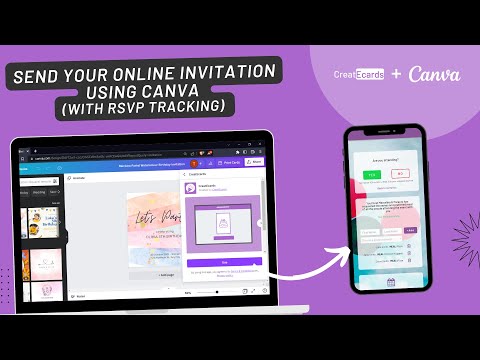
Making your own wedding invitations online is easier than ever. You can use various free tools that offer templates and design options to help you create beautiful invites.
Using Canva for Your Wedding Invitations
Canva is a popular choice for making wedding invitations. It offers a user-friendly drag-and-drop tool that lets you easily customize your designs. Start by browsing their extensive library of websites with countless invitation templates. You can select one that fits your style and then modify it by changing colors, fonts, and images.
Canva also provides options for adding embossed text and even simulating gold foil effects, giving your invitations a touch of elegance. Once you’re happy with your design, you can download and print your invitations directly from the site.
Exploring Adobe Express Features
Adobe Express is another excellent option for creating wedding invitations. It has many customizable templates, allowing you to choose a layout that speaks to your personality. Simply pick a design and edit it with your details.
Adobe Express features easy-to-use tools, including a powerful text editor for choosing font styles. You can add images or use their library of free stock images to enhance your invitations. Once completed, you can save your work or print from the platform.
Utilizing Free Stock Images and Embellishments
When making wedding invitations, adding visuals can make a big difference. Many online tools offer free stock images that you can use in your designs. This gives you access to high-quality photos and graphics without any extra cost.
In addition to images, consider using embellishments like borders or decorative elements. They can add personality to your invites and help convey your wedding theme. Most design platforms allow you to search for these extras specifically, making it easy to find what you need to complete your vision.
Finalizing and Sharing Your Invitations

Once you’ve designed your wedding invitations, it’s time to finalize them and explore sharing options. You’ll want to choose the right size for your invitations, consider how to download and print them, and decide on the best way to send them out to your guests.
Choosing the Right Invitation Size
Selecting the correct invitation size is important for both design and print. The standard invitation size is often 5” x 7”. This size fits well in most envelopes and allows your design to shine.
If you want something different, consider sizes like 4” x 6” or 6” x 8” depending on your theme.
Make sure to check the dimensions of the envelopes you plan to use. You wouldn’t want your beautiful invitation to be crammed into a too-small envelope! Many online platforms, like Canva, have preset sizes, making it easy for you to choose and get it just right.
Options for Downloading and Printing
After finalizing your design, you’ll need to download your invitation. Most websites offer convenient options to download your file in various formats, like PDF or JPEG.
If you’re using a service like Canva, consider their printing service, which allows you to print directly from their platform. Their prices can be reasonable, especially for bulk orders.
You should also think about whether you want to print at home or through a professional printing service. Printing at home can save money, but a professional finish might impress your guests more.
Make sure to collect RSVPs efficiently as well. You can create an online form to track responses easily.
Sending Invitations via Email or Social Media
Digital invitations are popular and super convenient. After downloading your invitation, you can easily send it via email or share it on social media.
Platforms like Facebook or Instagram can help you reach more guests quickly. If you choose to email your invitations, make sure to include all the details clearly.
You might even want to add a link for RSVPs to make it easier for guests to respond. Digital tools can make collecting RSVPs seamless and stress-free, allowing you to focus on other wedding details.